
Ledger Hardware Wallet Review
Introduction
In a world where billions of dollars in cryptocurrency are lost, hacked, or stolen every year, storing your digital assets securely has never been more important. According to recent data, over 60 crypto hacks occurred in just the first quarter of 2025 alone, resulting in losses of $1.63 billion — a staggering 131% increase compared to the same period in 2024. Against this backdrop, hardware wallets have emerged as the most trusted form of self-custody storage, and no name looms larger in that space than Ledger.
Founded in 2014 and headquartered in Paris, France, Ledger has grown into one of the world’s leading manufacturers of hardware crypto wallets. With a team of over 700 professionals and a decade of continuous innovation, the company has sold millions of devices worldwide and established itself as a gold standard for anyone serious about protecting their digital wealth.
But is Ledger still the best choice in 2025? And what do you need to know before handing over your money? This in-depth review covers everything — from the product lineup and security architecture, to the software ecosystem, pricing, and the controversies that have dogged the company over the years.
What Is Ledger and How Does It Work?
At its core, a Ledger device is a cold storage wallet — a physical hardware device that stores the private keys to your cryptocurrency completely offline. Unlike software wallets or exchange accounts, Ledger keeps your private keys isolated from the internet, meaning hackers cannot remotely access them, even when your device is connected to a computer or smartphone.
The fundamental principle is simple: your private keys never leave the device. Every outgoing transaction must be physically confirmed on the hardware wallet itself, making it virtually impossible for malware, phishing attacks, or remote exploits to steal your funds without your explicit physical approval. In essence, Ledger acts like a two-factor authentication system that requires a response from a device you physically hold.
Under the hood, Ledger devices run a custom operating system called BOLOS (Blockchain Open Ledger Operating System), which isolates each cryptocurrency app from the others. This is paired with a specialized Secure Element (SE) chip — the same type of tamper-resistant chip used in banking cards and passports — that stores your private keys and performs cryptographic operations in a protected enclave. Depending on the model, these chips carry either CC EAL5+ or CC EAL6+ certification, representing the highest commercial security standards in the industry.
The Product Lineup
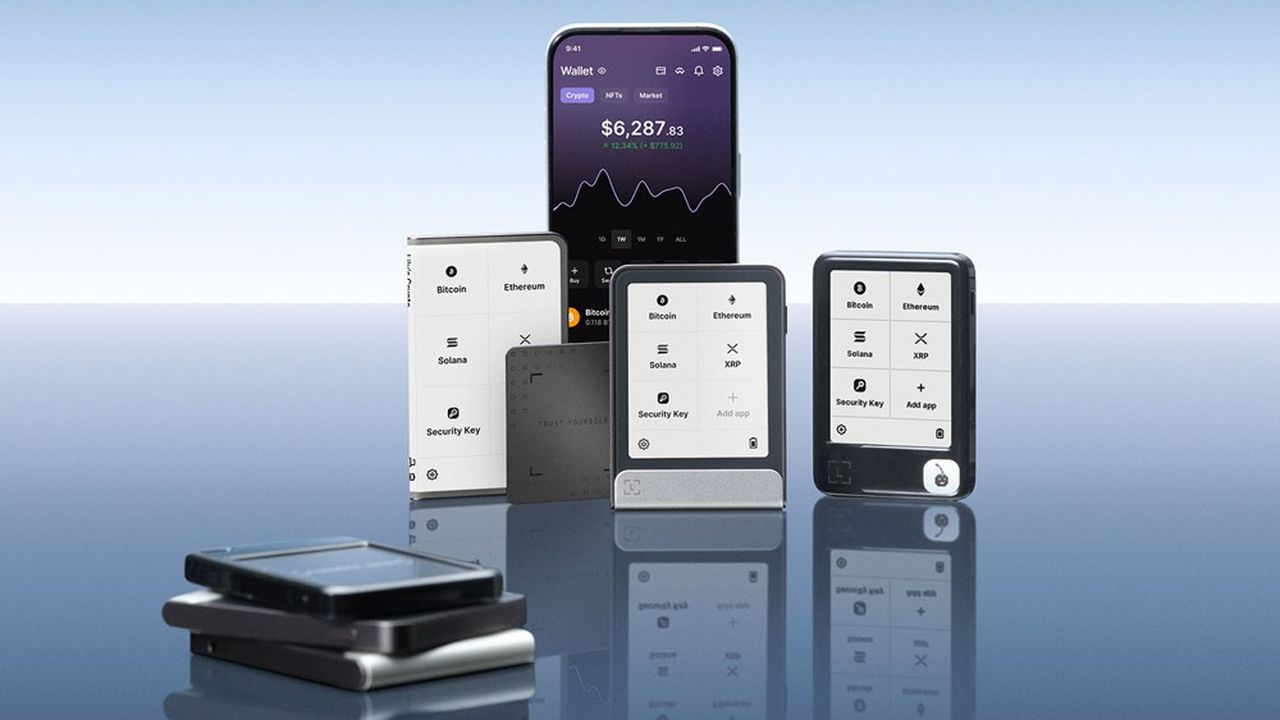
Ledger currently offers four main hardware wallet models, each targeting different users and budgets.
Ledger Nano S Plus — $79
The entry-level option, the Nano S Plus is a compact USB-drive-style device with a small 128×64-pixel OLED screen and two physical buttons for navigation. Despite its modest price point, it features the same CC EAL6+ certified Secure Element chip as more expensive models — meaning you do not sacrifice security to save money. It supports over 5,500 coins and tokens, stores up to 100 apps simultaneously, and connects via USB-C.
The trade-offs are clear: no Bluetooth, no battery (it must always be connected via cable), and the tiny screen can make reviewing complex transaction details cumbersome. But for beginners or users who primarily manage their crypto from a desktop, the Nano S Plus remains one of the best-value cold storage solutions on the market.
Ledger Nano X — $149
The Nano X is the classic mid-range choice that introduced Bluetooth 5.2 connectivity to Ledger’s lineup. This makes it compatible with iOS and Android via the Ledger Live mobile app, giving users the flexibility to manage their portfolio on the go without needing a laptop or desktop. It includes a built-in rechargeable battery with up to four hours of active use, supports up to 100 apps, and carries a CC EAL5+ certified chip.
The main consideration for the Nano X in 2026 is its positioning: at $149, it sits above the much-cheaper S Plus but below the newer touchscreen models, making it a middle-ground choice for mobile-first users who don’t yet want to invest in a premium device.
Ledger Flex — $249
Launched in mid-2024, the Flex represents a significant step forward in usability. Its standout feature is a 2.84-inch E-Ink touchscreen supporting 16 shades of gray — a massive improvement over the tiny OLED screens on the Nano models. It also adds NFC support (enabling FIDO2 two-factor authentication for external services), Bluetooth 5.2, USB-C, and an upgraded CC EAL6+ certified ST33K1M5 Secure Element chip.
The E-Ink display is a genuine improvement: it makes reading wallet addresses, transaction fees, and smart contract details far more comfortable, and its always-on visibility means you can see your lock screen image even without power. Users who’ve upgraded from the Nano X consistently describe the Flex as a meaningfully better experience.
The device is roughly the size of a thick credit card and includes magnetic connectors for compatible accessories. One notable limitation is its 1.5 MB internal storage, which fills up faster than expected when installing apps for multiple blockchains, sometimes requiring users to uninstall and reinstall apps as needed.
Ledger Stax — $399
The Stax is Ledger’s premium flagship and the most visually striking device in the lineup. Designed in collaboration with Tony Fadell — the creator of the iPod — the Stax features a 3.7-inch curved E-Ink touchscreen that wraps around the edge of the device, a credit card-sized profile, embedded magnets that allow multiple devices to stack neatly together (hence the name), and support for Qi wireless charging.
At its price point, users are largely paying for design, display, and experience rather than additional security — all Ledger models share the same foundational security architecture. But for collectors, DeFi power users, and those who appreciate premium hardware, the Stax offers something genuinely compelling: a device that feels luxurious to hold, displays your favorite NFT as the lock screen wallpaper, and charges wirelessly like a smartphone.
Ledger Live: The Software Ecosystem
Hardware is only half the story. Ledger’s devices work in conjunction with Ledger Live, the company’s official companion application available on Windows, macOS, Linux, iOS, and Android.
Ledger Live serves as the command center for everything: sending and receiving crypto, viewing your portfolio, buying and selling assets through integrated third-party providers (including PayPal, MoonPay, and Ramp), staking tokens, and accessing decentralized applications. All private keys remain on the hardware device — Ledger Live is the interface, not the vault.
The app has improved significantly over the years and now supports over 5,500 assets, native NFT management, built-in staking rewards, and DeFi integrations. It also connects to popular third-party wallets like MetaMask, Coinbase Wallet, MyEtherWallet, and Phantom, giving users flexibility to interact with DApps that may not be natively supported in Ledger Live.
One significant change is that Ledger sunsetted its browser extension in 2024. While this streamlined the user experience in some ways, it introduced friction for users who had built workflows around the old extension-based approach.
Security Architecture: Strengths and Weaknesses
What Makes Ledger Secure
Ledger’s core security proposition is strong. The Secure Element chip is genuinely difficult to attack — it is the same class of hardware used in passports, credit cards, and SIM cards. Private keys are generated and stored exclusively inside this chip, never exposed to the host device. Even when signing transactions, the private key never leaves the Secure Element.
Each device requires a 4–8 digit PIN to unlock, and entering the wrong PIN three times triggers an automatic factory reset, wiping the device and preventing brute-force physical attacks. Recovery relies on a standard 24-word BIP39 seed phrase generated during setup, plus an optional 25th “passphrase” for an additional layer of protection.
Ledger also introduced Clear Signing — a feature that translates raw transaction data into human-readable summaries directly on the device screen, helping users verify exactly what they are authorizing before signing.
The Ledger Recover Controversy
In May 2023, Ledger announced Ledger Recover — an optional paid subscription service allowing users to back up their seed phrase via encrypted key sharding across three independent companies (Ledger, Coincover, and EscrowTech). In a worst-case scenario where a user loses their device and seed phrase, they can verify their identity and restore their wallet.
The community reaction was immediate and sharp. Many users argued that the mere existence of this feature revealed something they had not previously understood: that Ledger’s firmware was technically capable of exporting key material from the Secure Element under specific conditions. For users who had built their security model on the assumption that keys could never leave the device, this was a conceptual shift from a trustless model to a trusted one.
Ledger maintains that Recover is entirely optional, that the key material is encrypted before export, and that the hardware has not been compromised. But the controversy did lasting damage to trust in the brand among privacy-conscious users.
The Closed-Source Firmware Issue
Another ongoing criticism is that Ledger’s device firmware is proprietary and closed-source. While Ledger’s companion apps (Ledger Live and the app libraries) are open-source and publicly audited, the core operating system running on the hardware is not. This makes independent verification of the firmware’s security claims impossible without trusting Ledger’s own audits.
This is a meaningful distinction from competitors like Trezor, whose firmware is fully open-source — though Trezor has historically traded hardware security (using microcontroller units rather than dedicated Secure Elements) for software transparency.
The Data Breach History: A Critical Concern
Perhaps the most significant blemish on Ledger’s record is not a hardware exploit, but a recurring pattern of customer data exposure.
In June 2020, an attacker gained access to Ledger’s e-commerce and marketing database through a misconfigured API key, exposing approximately 1.1 million email addresses and 272,000 detailed records including full names, phone numbers, and home addresses. When this data was publicly dumped in December 2020, it triggered an extended wave of targeted phishing attacks, threatening emails, and physical confrontations against Ledger customers.
The fallout from this breach has never fully ended. The same dataset has been recycled across phishing campaigns through 2021, 2024, and into 2025. In January 2025, Ledger co-founder David Balland and his partner were kidnapped in France by attackers using information from the leak — a harrowing reminder that exposing home addresses of known cryptocurrency holders carries real-world physical risk.
In January 2026, a second major customer data incident emerged. This time, a breach occurred at Global-e, a third-party e-commerce partner, which exposed order data — including names, postal addresses, emails, phone numbers, and purchase details — for an unspecified number of Ledger customers. Critically, Ledger’s hardware, firmware, and seed phrases were not compromised. But the practical effect was the same: a fresh list of confirmed hardware wallet owners with home addresses entered phishing pipelines.
It is important to note a crucial distinction: in none of these incidents were private keys, seed phrases, or crypto holdings directly compromised. Ledger’s hardware security model held. But the customer identity infrastructure repeatedly failed, and that failure has made Ledger customers disproportionate targets for social engineering and physical threats.
Pros and Cons Summary
Strengths:
- Industry-leading Secure Element chips (CC EAL5+ and EAL6+) across all models
- Wide range of products covering budgets from $79 to $399
- Supports 5,500+ cryptocurrencies and tokens
- Ledger Live is feature-rich: staking, DeFi, NFT management, and buying/selling
- Compatible with MetaMask, Coinbase Wallet, Phantom, and many other third-party wallets
- Both iOS and Android mobile support (Nano X and newer models)
- Physical confirmation required for all outgoing transactions
- Strong track record: no Ledger hardware has ever been remotely hacked to extract private keys
Weaknesses:
- Closed-source firmware reduces independent verifiability
- Repeated customer data breaches (2020 and 2026) have made users phishing targets
- Ledger Recover controversy shook community trust in the security model
- Limited storage on the Flex (1.5 MB) requires app management
- Premium models (Flex, Stax) carry a high price premium over comparable alternatives
- Bluetooth connection reported as occasionally buggy on some models
How Does Ledger Compare to the Competition?
The main competitor is Trezor (made by SatoshiLabs), which offers fully open-source firmware and a strong reputation for transparency. However, Trezor’s entry-level models use microcontroller units rather than dedicated Secure Element chips, which some security researchers argue represents a weaker hardware security boundary. Trezor’s flagship Safe 5 does include a Secure Element chip and a color touchscreen, positioning it as a more direct Stax competitor.
For users who prioritize open-source auditability and are willing to accept a slightly different hardware security trade-off, Trezor is a legitimate alternative. For users who want maximum hardware security certification and the largest ecosystem of supported assets, Ledger remains the stronger choice.
Who Should Buy a Ledger?
Beginners and budget-conscious users should look at the Nano S Plus ($79). It offers the same foundational security as the premium models at a fraction of the cost, and for most users’ needs — cold storage of Bitcoin, Ethereum, and common altcoins — it does the job excellently.
Mobile-first users with iPhones need either the Nano X ($149) or a touchscreen model, since iOS requires Bluetooth connectivity and the Nano S Plus doesn’t support it.
Active DeFi users and everyday traders will benefit most from the Ledger Flex ($249), where the larger E-Ink touchscreen makes transaction verification genuinely more intuitive and the NFC support adds utility.
Premium buyers and collectors who want the best Ledger has to offer — including wireless charging, a beautiful curved display, and the ability to display NFTs as a lock screen — should consider the Ledger Stax ($399), understanding that they’re paying primarily for design and experience rather than additional security.
Final Verdict
Ledger remains one of the most trusted and capable hardware wallet manufacturers in the world, and for good reason. A decade of iteration has produced a product ecosystem that covers virtually every use case, a companion app that rivals some software-only wallets in features, and a hardware security model that has never been compromised by remote attack.
However, “never been remotely hacked” is not the same as a flawless reputation. The repeated failure to protect customer identity data — while not touching the cryptographic security of the devices themselves — has created real-world harm for users whose home addresses, names, and phone numbers have circulated in criminal ecosystems for years. The Ledger Recover controversy, while technically valid, created legitimate concerns about trust and transparency that the company has struggled to fully address.
For most cryptocurrency users, Ledger still represents the clearest path to serious self-custody security at an accessible price. But buying a Ledger device is only half the security equation. The other half requires vigilance: treating your seed phrase as a state secret, being alert to phishing, and understanding that the most dangerous attacks on your crypto are likely to come through your email inbox or front door, not through the hardware in your pocket.